Cura
A flexible medication-support system.
The original case study, rebuilt for the web in the same order: research, synthesis, structure, testing, and the final design.

Research had to explain routine breaks, not just forgetfulness.
Four research lenses moved from broad context into direct conversation, synthesis, and two rounds of prototype testing.
The plan followed behavior from context to validation.
The work moved from broad context into direct conversations, synthesis, structure, and two rounds of prototype testing.
Survey responses
Medication habits, reminder use, and routine changes
Interviews
Failure moments, coping behavior, and caregiver friction
Testing rounds
Four participants in each moderated round
Research lenses
Literature, survey, interviews, and market review
The central insight reframed adherence as a routine problem.
One line captures why reminders fail: routines break, not memory.
Main insight from research
Medication adherence breaks when routines change, not simply because people forget.
Raw survey and interview evidence stayed visible.
Eighteen survey responses and five interviews were grouped into seven behavioral themes before any design decision.
The raw evidence stayed visible behind the synthesis.
Survey patterns and interview fragments were kept separate before they were grouped into seven themes.
A new medication breaks an established habit
Routine disruptionTravel changes the expected schedule
Routine disruptionDoctor-led timing changes are easy to forget
Routine disruptionSeveral medications are difficult to juggle
Mental loadOlder adults can lose track of what is current
Mental loadRepeated decisions add effort
Mental loadToo many alerts become background noise
Reminder fatigueExact-time alarms do not match daily life
Reminder fatigueDismissed reminders offer no recovery path
Reminder fatigueSmall delays can create unnecessary worry
Caregiver frictionConstant visibility can feel intrusive
Caregiver frictionSupport needs clear boundaries
Caregiver frictionPeople need to know whether a dose was logged
Trust and visibilityHistory should explain what happened
Trust and visibilityState changes must be visible
Trust and visibilityLate-dose uncertainty causes anxiety
Recovery after delayA missed action needs a clear next step
Recovery after delayThe interface should avoid guilt
Recovery after delayToo many fields appear at once
Setup frictionMedical language increases effort
Setup frictionAdding a changed prescription should be quick
Setup friction16 of 18 participants reported taking regular medication.
13 of 18 did not use a reminder application.
3 of 18 used only a pill organizer.
The concept narrowed to one person and one bounded supporter.
Research ruled out constant caregiver monitoring in favor of a shared dose state with consent-based visibility.
The concept was remodeled around bounded support.
Research narrowed the system to one person maintaining a routine and one supporter who is involved only when the situation meaningfully changes.
Independent routine
Flexible time windows and clear recovery keep control with the person taking medication.
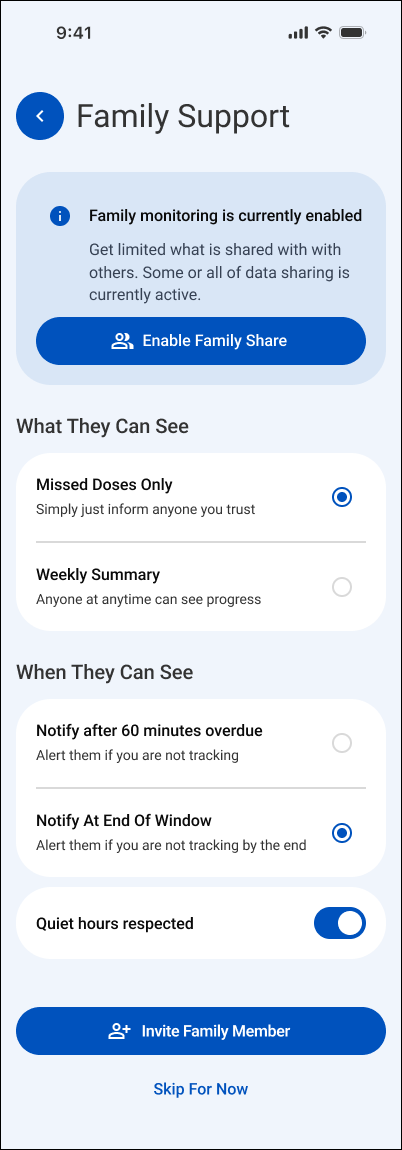
Meaningful exceptions
Explicit consent and delayed escalation reduce monitoring pressure and notification fatigue.
A problem statement anchored every later decision.
Every wireframe and interface choice traces back to this single question.
Post-research problem statement
How might we help people maintain medication routines through everyday change, recover confidently after a delay, and involve caregivers only when support is genuinely needed?
One persona carried the design forward.
Ananya is a composite drawn from recurring patterns across participants, not one individual.
One primary persona held the design decisions together.
Ananya is a composite archetype drawn from recurring research patterns, not a representation of one named participant.
Ananya R.
Independent routine manager · 34
About
Ananya manages recurring medication around a busy, changing day. Her established routine usually works, but a new prescription or unexpected schedule change makes it easy to lose track.
Needs
- A clear view of what is due now
- Fast updates when medication changes
- A recovery path after a late reminder
Wants
- To stay independent
- To avoid feeling judged by the interface
- To reassure family without constant monitoring
Pain points
- Exact-time alarms conflict with real routines
- New tablets interrupt established habits
- Existing tools make changes feel complicated
Says
“Adding a new tablet throws my whole morning off.”
Does
Uses phone alarms and relies on an established daily sequence.
Hears
Instructions from a doctor and occasional check-ins from family.
Thinks
Did I already take this, and is it too late now?
Sees
Several medicines, changing instructions, and alerts competing for attention.
A routine break has an emotional cost.
The journey traces confidence from a calm morning dose through a missed alarm and back to recovery.
A routine break revealed the emotional cost of uncertainty.
The representative scenario maps where confidence falls after a dismissed alarm and rises only when the system offers a clear recovery path.
- Calm
Wake up
- Confident
Morning dose
- Confused
Routine break
- Frustrated
Missed alarm
- Anxious
Late dose?
- Unsure
Recovery
- Embarrassed
Caregiver alert
- Relieved
Evening dose
The visual language stays calm on purpose.
One action blue, generous white space, and plain language keep medication status the focus, not the styling.
The visual language is calm, direct, and reassuring.
Cura uses one strong blue for action, pale blue for orientation, generous white space, and plain language so medication status remains the focus.
Action blue#0759c7
Soft blue#dce9f8
Canvas#f3f7fd
Ink#25292e
Clear hierarchy, open forms, and readable interface labels.
Routine first
One clear action
Visible status
Support without pressure
Two flows carry the entire experience.
Setting up a medication and completing a dose are the only two journeys that matter every day.
Two flows carry the core experience.
One sets up a medication without exposing the entire task at once. The other moves a dose from reminder to a shared, resolved status.
Add medication
- 1
Choose input method
- 2
Enter medication details
- 3
Set routine and reminders
- 4
Review and save
Complete a dose
- 1
See what is due
- 2
Open reminder
- 3
Taken, snooze, or skip
- 4
Confirm shared status
Four familiar destinations organize the app.
Daily action, medication management, family support, and settings stay separated instead of collapsing into one screen.
The information architecture follows four familiar destinations.
Daily action stays in Home, medication management has its own space, family support remains bounded, and notification behavior stays in Settings.
Home
- Today
- Time windows
- Dose status
Medications
- Medication list
- Add medication
- Schedule
Family
- Consent
- Members
- Meaningful alerts
Settings
- Notifications
- Quiet hours
- Profile
Low-fidelity screens established the structure first.
Navigation, scheduling, dose actions, and family visibility were tested before visual polish began.
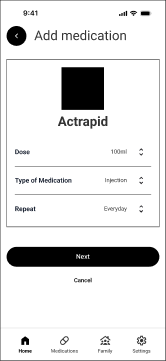
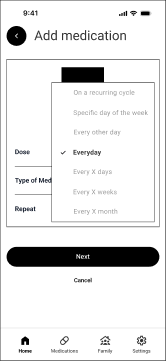
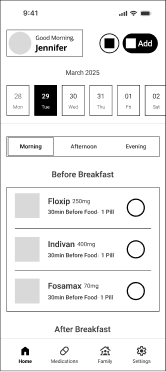
The full wireframe set connected setup, action, and support.
Low-fidelity screens established navigation, scheduling, dose actions, and family visibility before visual polish.
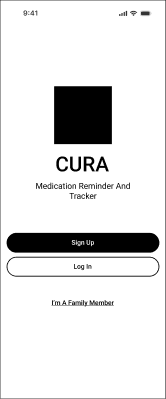
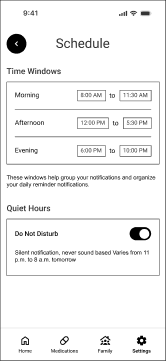
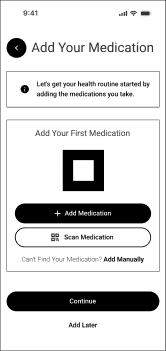
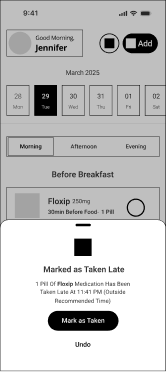
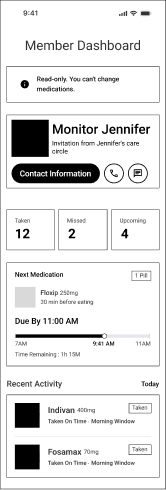
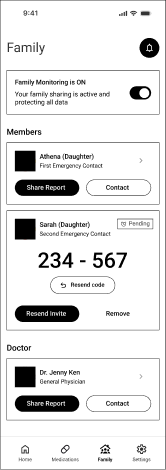
Five states keep every screen consistent.
Upcoming, due, late, taken, and missed read the same way in the daily view, reminders, history, and caregiver view.
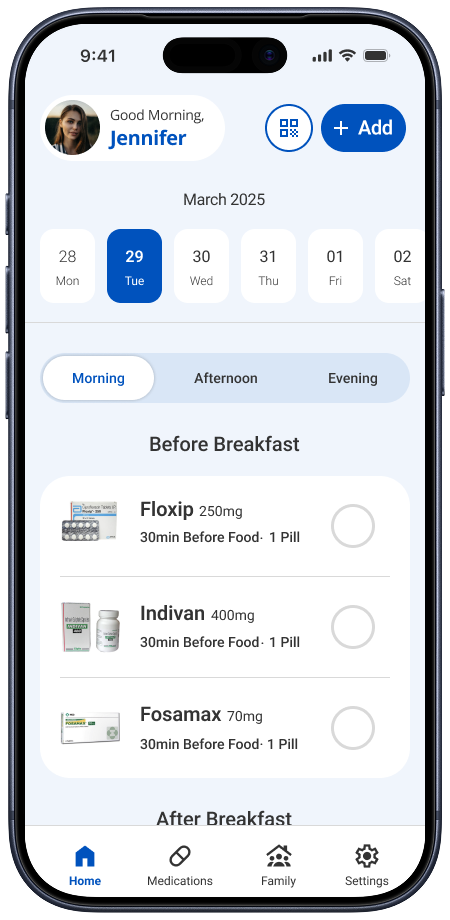
Five states keep every screen consistent.
Click a state to see the real screen behind it. The daily schedule, reminders, history, and caregiver view all read from the same dose status.
One approach was tested and rejected before this one.
Reminder timing was modeled two ways during early research.
Exact clock-time alarms
Precise, but it assumes medication fits a fixed schedule. Testing and interviews showed real routines move around meals, sleep, and work, not the clock.
Flexible time windows
A dose belongs to a practical period of the day, so the reminder bends to the routine instead of demanding the routine bend to it.
What testing exposed.
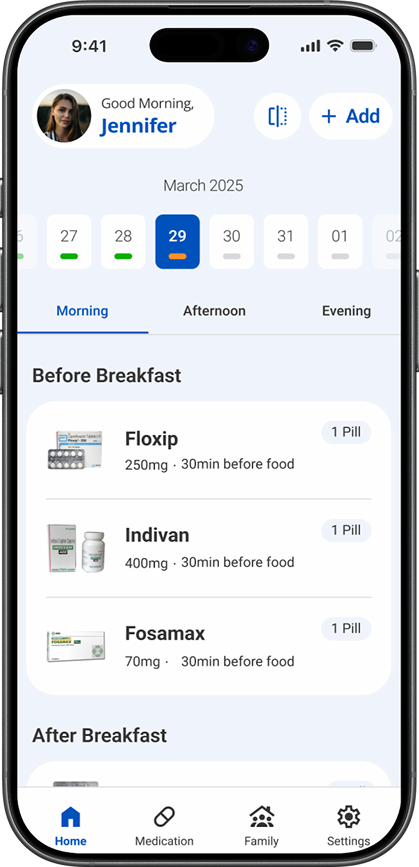
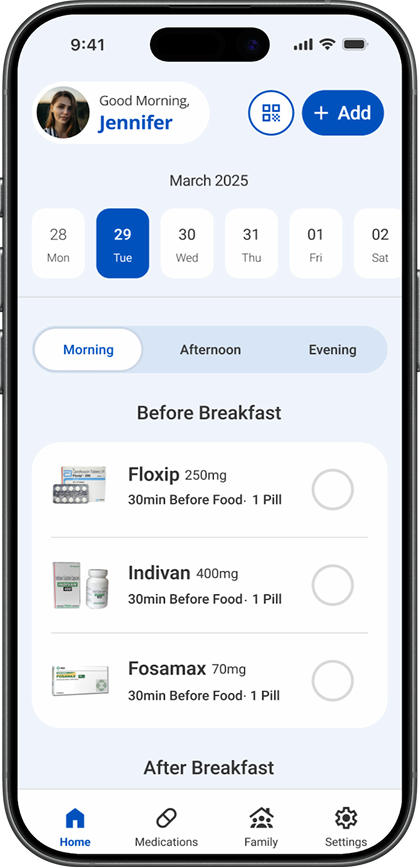
Two rounds of moderated testing changed the calendar signal, the primary gesture, the tab treatment, and the entry point.
The daily schedule became easier to read and act on.
Progress bars were removed, the hidden swipe interaction became a visible tap control, and the time-window tabs gained stronger presence.
Medication entry changed from one long form to two focused forms.
The task was divided so users no longer had to process all medication and scheduling fields at the same time.
- 01Medication details
Complete the first focused part of setup.
- 02Routine details
Continue to the remaining schedule information.
| Observed | Changed | Result |
|---|---|---|
| Calendar progress bars were not understood without explanation. | Removed the bars and moved completion feedback beside each medication. | The final screen no longer asks people to decode an unexplained calendar signal. |
| Nobody discovered swipe-to-complete without instruction. | Replaced the hidden swipe gesture with a visible tap control. | All four participants in the next round completed the interaction correctly. |
| Morning, afternoon, and evening tabs were mistaken for filters. | Increased their size and contrast while preserving time windows. | The final control gives each time window stronger navigational emphasis. |
| Separate Add and Scan actions created hesitation. | Kept one Add entry point and placed Scan inside the flow. | The entry point now asks for one decision before showing input methods. |
What the case study doesn’t usually show.
The trade-offs made, the conversation that questioned the whole premise, the direction that failed in testing, and what a restart would change.
The trade-offs
Choosing flexible time windows over exact clock-time alarms meant giving up precision: a window is a looser promise than a single minute, and that ambiguity had to be designed around rather than hidden. Limiting caregiver visibility to meaningful exceptions instead of full monitoring meant giving up constant caregiver oversight, in exchange for not turning every dose into a surveillance moment for the person taking it.
The uncomfortable conversation
The hardest question wasn’t from a testing session: it was being asked directly why this needed to be its own app at all, instead of two features added to Apple Health or an existing medication tool. There wasn’t a defensive answer, because there wasn’t supposed to be a new app: building it standalone was the fastest way to find out whether flexible time windows and a shared dose state were actually worth having, or whether it was a feature I’d talked myself into caring about more than real users would.
The wrong turn
An early version of the daily screen used small colored progress bars under each calendar date and a swipe gesture to mark a dose as taken. Both failed in testing: the progress bars looked fine but nobody checked them without being told what they meant, and no participant swiped without being told to. The swipe was replaced with a one-tap toggle, which every participant then completed correctly.
What I’d do differently today
I’d pair the app with a physical product instead of shipping software alone: medication storage is its own real problem, separate from the reminder stress this project addressed, and a physical object would let the two solve different halves of the same routine instead of asking software to carry both. I’d also go back and solve an edge case testing never covered: the notification model works cleanly for one medication, proven in testing, but stacking two or more doses due at once is a case the current design doesn’t yet handle.
Learnings, reflection, and what comes next.
The project's strongest lesson is about behavior and trust, not visual polish.
A hidden gesture is not a control.
Swipe-to-complete felt natural to design, but no participant discovered it without being told. Every meaningful action needs a visible, discoverable control.
Timing should model behavior, not the clock.
Exact-time alarms fight how people actually take medication, which happens around meals, sleep, and work, not at a fixed minute.
Recoverable and missed are not the same state.
Separating late from missed removes guilt from a moment that is still fixable, and only escalates to a caregiver when it truly matters.
The system is the reminder.
Cura succeeds only when a dose's status (upcoming, due, late, taken, or missed) stays trustworthy across the phone and the caregiver view alike.